Going deeper? This page is the introduction. For a field-by-field tour of the daimon spec — every YAML section, what each field unlocks, and what you can build with it — read the deep dive.
What a daimon is
A daimon is the long-running daemon Okesu installs on each host. It listens for run dispatches from the control plane, executes the agent (Claude / Codex / a custom provider), and streams findings back over the management tunnel.
One daimon per host. It’s the piece that runs.
The Go binary is called okesu; the same binary serves as daemon and CLI depending on the subcommand. Out of the box it ships with a small library of built-in agents (edr, instance-integrity, instance-threat, sre-health, log-investigator, log-sigma-hunter) so a fresh daimon has something to do on tick zero.
The log-sigma-hunter daimon ships paired with an IOC feeds + Sigma rules catalog: the CP curates Sigma detection rules per fleet, the daimon evaluates them against local logs, and matches surface as ordinary findings. Cross-references log-investigator for deeper analysis on whatever it surfaces.
Where it runs
The daimon is a static Go binary. It runs anywhere a recent Linux or macOS host runs — no JVM, no Python, no agent framework. Memory footprint is modest (tens of megabytes idle). It needs:
- Outbound HTTPS to the control plane (default port 8443) for dispatch + tunnel.
- A writable directory for state (default
/var/lib/okesu). - Credentials for the LLM provider it’ll drive (env vars for Claude / Codex tokens).
That’s the deployment surface. Drop the binary in, hand it the CP URL and a bootstrap token, it registers and goes to work.
Lifecycle
A daimon’s life follows five stages — every running daimon is currently sitting in one of them:
- install — drop the binary; create the systemd unit (or your supervisor of choice).
- register — first contact with the CP; the CP issues the daimon a long-lived agent token bound to its hostname.
- heartbeat — every few seconds the daimon ping-pongs with the CP so dispatches are deliverable.
- execute runs — the CP dispatches a run; the daimon runs the agent and streams JSONL events back.
- upgrade in place — the CP can push a new binary; the daimon swaps itself out under systemd and re-registers with the same identity.
The heartbeat is what makes the dashboard’s “online/offline” indicator work. Lose connectivity for too long and the daimon shows as stale; reconnect and the heartbeat resumes from wherever it left off.
The dispatch contract
A run dispatch is a small JSON envelope. It tells the daimon which agent to run, what prompt to render, what inputs to bind, and what dispatch mode to use (tunnel for live tunnels, jobs for offline pull queue).
{
“step_id”: “scan@web-prod-01”,
“agent”: “edr-investigator”,
“prompt”: “check for C2 indicators around process 12345”,
“inputs”: { “pid”: 12345 },
“timeout”: “5m”
What the daimon emits is a sequence of newline-delimited JSON events — most importantly finding events for security signals and a final orchestration_result for the structured payload downstream steps consume.
Tunnel vs jobs mode
Two transports for getting work to a daimon:
- tunnel — the daimon holds a long-running mTLS connection to the CP. Dispatches arrive in real-time over that tunnel; findings stream back the same way. Best for hosts with stable outbound network.
- jobs — the daimon polls an S3 dead-drop bucket on an interval. The CP writes job envelopes; the daimon picks them up, runs the agent, writes findings back. Best for offline / restricted networks where outbound HTTPS is the only thing allowed, or for hosts that should never hold a connection open.
The same daimon binary supports both. Each orchestration step picks its preferred mode via dispatch: in the spec; if the daimon’s tunnel is up, dispatches use it, otherwise they fall back to the bucket.
Auto-deploy & upgrades
The CP can deploy a daimon to a new host (rsync the binary, write the systemd unit, register the agent token) and upgrade an existing one in place. The daimon process replaces its own executable, restarts under systemd with the same identity, and resumes its heartbeat. Operators don’t manage host-by-host installations.
In the platform
What daimons produce shows up in the operator’s Findings view — severity-stratified counts, per-category breakdown, per-agent attribution, and the live feed itself.
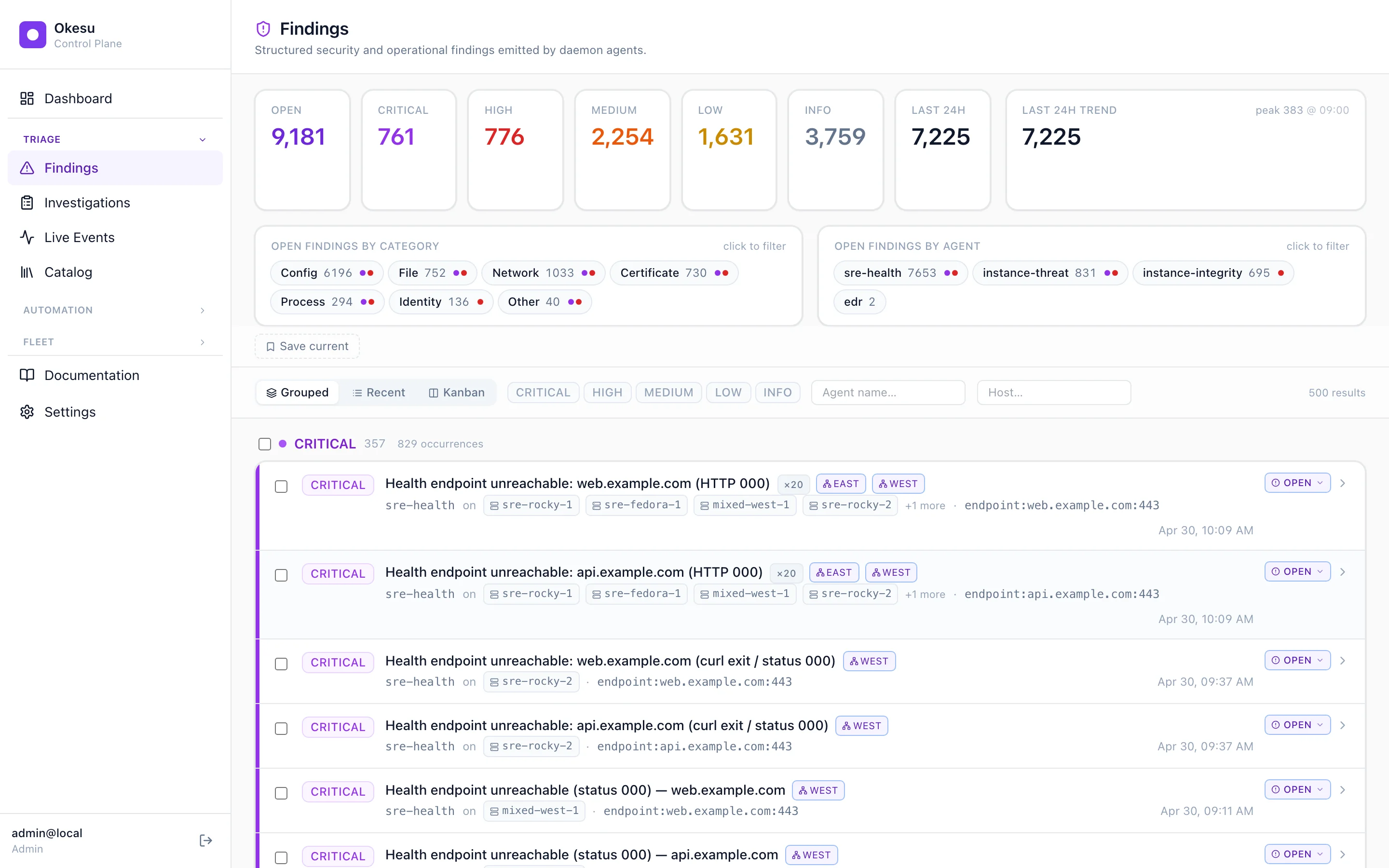
Findings emitted by daimons across the fleet, grouped by severity and clustered by IOC.
Where to next
- Agents — the prompt + tool definitions the daimon executes.
- Orchestrations — the YAML specs that dispatch runs to daimons in sequence.
- Install Okesu — drop a daimon onto your first host.