What an orchestration is
An orchestration is a YAML spec that describes a sequence of agent runs. Each step says which agent to run, which host(s) to run it on, and what prompt to give it. The control plane parses the spec, dispatches each step in turn, persists results, and renders a live DAG on the run-detail page.
Orchestrations are not “if-this-then-that” workflows. They’re investigative playbooks — the kind of “here’s how a senior analyst would approach this” runbook you’d otherwise carry around as a Confluence page. Okesu makes those runbooks executable.
The YAML spec
A minimal orchestration looks like this:
---
name: c2-callback-triage
description: triage a suspected C2 callback
steps:
- id: scan
agent: edr-investigator
node: "{{trigger.host}}"
prompt: “check for C2 indicators around process {{trigger.pid}}”
- id: contain
agent: forensic-collector
node: "{{trigger.host}}"
prompt: “snapshot volatile state from {{scan.result.pid}}”
approval: required
The {{trigger.X}} placeholders bind context from whatever fired the orchestration (a finding, a manual run, a scheduled cron). {{stepN.result.field}} binds structured data from earlier steps.
Fan-out across hosts
Replace node: with nodes: and an array of hostnames. The engine dispatches the step on every host in parallel, aggregates the results, and exposes per-host status on the run-detail canvas.
- id: scan
agent: edr-triage
nodes: [web-prod-01, web-prod-02, web-prod-03]
prompt: “sweep for known IOCs”
The platform’s run viewer renders a per-host status strip — a colored dot per host plus a histogram bar — so you can see which host succeeded, failed, or is still running at a glance. Failed hosts surface inline with their error.
Approval gates
Add approval: required to any step. The engine pauses the run at that step until an operator approves it from the dashboard. Useful for steps that mutate state — containment actions, tag changes, finding triage — where you want a human in the loop. The CP enforces a per-action-class allowlist so a runaway agent can’t push beyond what’s been pre-authorised.
Branching on results
Steps can read structured fields from earlier steps via the binding system. An agent that emits an orchestration_result finding exposes its attributes as {{stepN.result.X}}; the next step can use them in its prompt or as input parameters.
For runs that fanned out, each host’s payload is also addressable: {{stepN.byNode["host-1"].result.foo}}.
Selectors & labels
Hard-coded host arrays don’t scale. Okesu’s labels are a generic, cross-entity tagging system — every entity (hosts, daimons, agents, findings, investigations, IOCs) has a labels editor on its detail page. The label index lives in one table; the labels themselves are arbitrary key/value strings (env=prod, tier=web, compliance=pci).
An orchestration step can replace the explicit nodes: array with a selector expression — the engine resolves the selector at dispatch time and fans out across whatever matches:
- id: scan
agent: edr-triage
nodes_selector: “label:env=prod AND label:tier=web”
prompt: “sweep for known IOCs”
Move a host between environments and the selector picks up the change automatically — no orchestration edit required. The same selectors drive notification rules and the cmd-K shortcut (label:tier=web) for jumping to filtered list pages.
Triggers
Three ways an orchestration starts running:
- finding match — a CP-side rule watches incoming findings and fires an orchestration when one matches the rule’s filter (severity, category, agent, attributes).
- manual run — an operator clicks Run in the dashboard, optionally supplying inputs.
- cron schedule — a recurring orchestration fires on a cron expression for proactive sweeps.
Whatever the source, the orchestration spec sees the trigger context as {{trigger.X}}, so the same playbook handles all three modes without spec changes.
In the platform
The Orchestrations editor is a drag-and-drop canvas: agents on the left, the DAG in the middle, an inspector on the right. Steps with nodes: […] render as fan-out cards (purple border, host bullets); steps with approval: required get a gated badge.
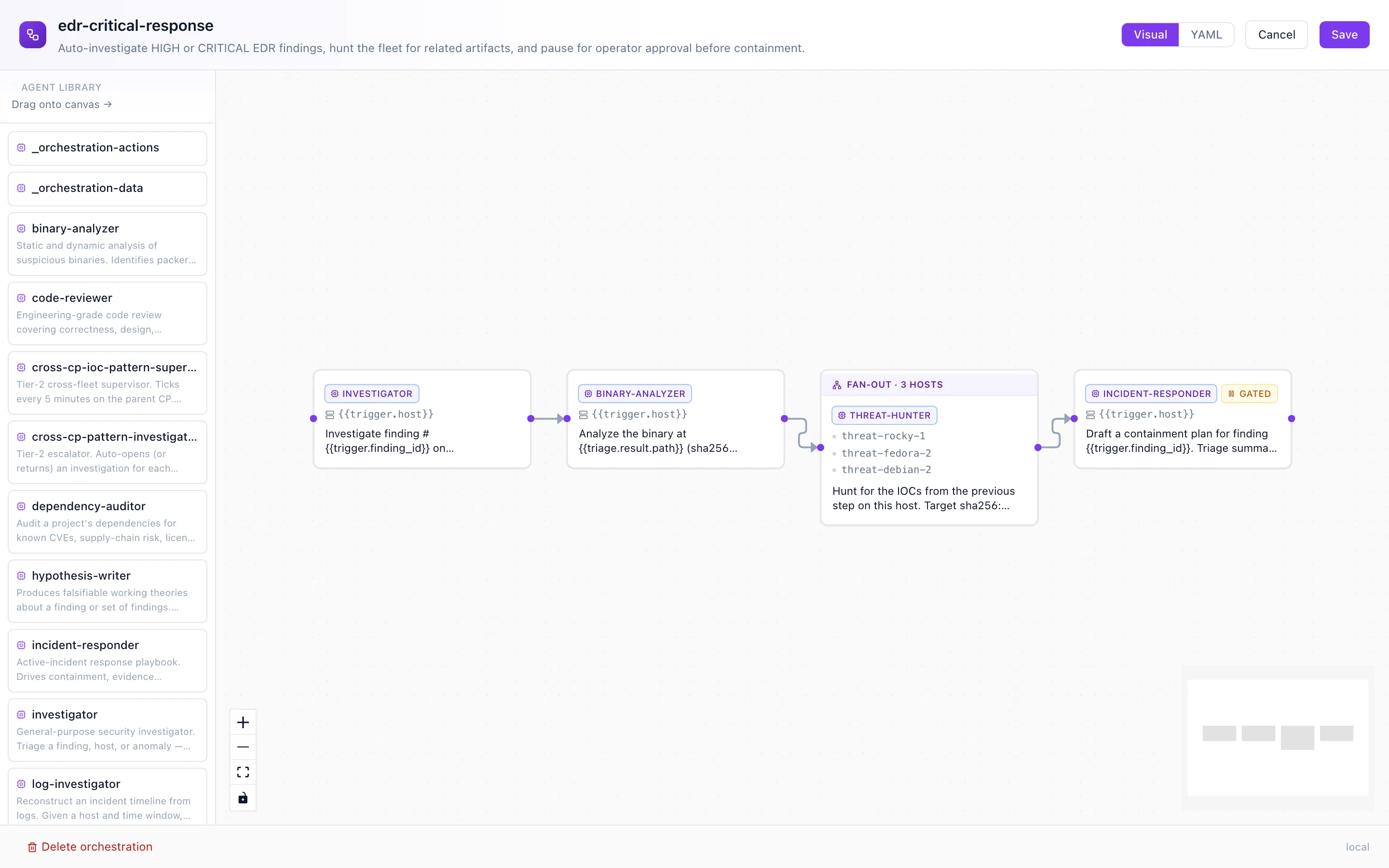
The editor canvas — agents palette, DAG, fan-out + approval-gated steps rendered with their distinct chrome.
Where to next
- Daimons — what runs the dispatched steps.
- Agents — the worker units orchestrations sequence.
- Install Okesu — bootstrap a CP and write your first orchestration.